
Download AndFTP – FTP Client, SFTP, Secure File Transfer, Android Utility
Overview
AndFTP is a dedicated FTP client designed for Android devices, offering a reliable solution for managing file transfers between mobile devices and remote servers. It supports both FTP and SFTP protocols, enabling users to securely upload, download, and manage files across networks. The software is particularly useful for professionals handling website maintenance, developers managing server-side files, and individuals requiring secure backup solutions.
Its ability to handle multiple FTP configurations allows users to switch between different servers seamlessly, making it ideal for users managing several projects or hosting environments. The app also includes resume support for interrupted transfers and SSH key authentication, enhancing both reliability and security. While the developer’s background is not specified in the provided details, the app’s consistent updates suggest ongoing support and attention to compatibility with current Android versions.
Real-world use cases include updating website content, synchronizing project files, and transferring large datasets securely. The software is accessible to both beginners and advanced users due to its intuitive interface and layered feature set.
Key Features & Capabilities
- Multi-Protocol Support – AndFTP supports both standard FTP and secure SFTP connections, allowing users to choose the appropriate protocol based on their security needs. This dual support makes it suitable for environments ranging from public file sharing to private server access.
- Multiple Server Profiles – Users can save and manage multiple FTP configurations, including server addresses, login credentials, and connection settings. This feature is especially beneficial for professionals who work with several remote servers.
- Resume Support – In the event of a connection interruption, AndFTP allows users to resume file transfers from the point of failure, preventing the need to restart large uploads or downloads.
- SSH Key Authentication – The app supports SSH keys for secure authentication, providing a more robust alternative to password-based logins and reducing the risk of unauthorized access.
- Advanced File Management – Beyond basic file transfer, AndFTP enables users to modify file permissions (chmod), execute custom commands on the server, and manage directory structures directly from the device.
- Intuitive Interface – The user interface is designed for ease of navigation, allowing users to browse remote servers and local storage with minimal friction, even on smaller screens.
User Interface, Workflow & Performance
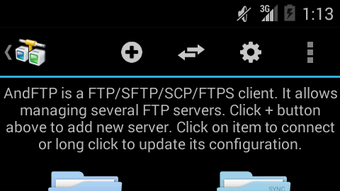
AndFTP features a clean, organized interface that prioritizes functionality and accessibility. The main screen displays a dual-pane layout, showing local device storage on one side and the connected server directory on the other, enabling efficient drag-and-drop or manual file transfers. Navigation is straightforward, with clearly labeled buttons for connection management, file operations, and settings.
The workflow is optimized for mobile use, with touch-friendly controls and responsive feedback. Users can quickly connect to saved servers, browse directories, and initiate transfers without navigating through multiple layers. While specific performance metrics such as CPU or RAM usage were not provided, the app is designed to operate efficiently within standard Android constraints.
The developer did not specify resource usage details, but general behavior suggests stable performance during typical file transfer operations. Stability appears consistent, particularly given the regular update cycle. The app maintains responsiveness even during long-running transfers, and interruptions are handled gracefully through resume functionality.
Compatibility & System Requirements
AndFTP is designed for Android devices and is available as an APK file. The software is compatible with a wide range of Android versions, though the exact minimum OS version is not specified. Installation size is not provided, but the app is categorized as a lightweight utility.
The developer did not list detailed hardware requirements, so users should rely on standard Android device capabilities for optimal performance. Compatibility information was partially provided, and users are advised to ensure their device meets general Android system standards. For users seeking the latest version, regular updates are available through official channels, ensuring ongoing compatibility with evolving Android security standards and API changes.
Pros and Cons
Pros
- Supports both FTP and SFTP protocols for flexible and secure file transfers
- Allows management of multiple server configurations with ease
- Resume support prevents data loss during interrupted transfers
- SSH key authentication enhances connection security
- Intuitive, mobile-optimized interface for smooth navigation
- Regular updates ensure compatibility and security
Cons
- Exact system requirements and installation size were not specified
- No official mention of cloud integration or file synchronization features
- Advanced features may require some learning for complete beginners
- Pro version is available, but pricing and feature differences are not detailed
FAQ Section
Is AndFTP available for free?
Yes, AndFTP is available for free, though a Pro version exists with additional features. The free version includes core functionality such as FTP/SFTP support, multiple server profiles, and resume transfers.
Does AndFTP support secure SFTP connections?
Yes, AndFTP supports SFTP (SSH File Transfer Protocol), providing encrypted communication for secure file transfers between the Android device and remote servers.
Can I manage multiple FTP servers with AndFTP?
Yes, the app allows users to save and switch between multiple FTP configurations, making it easy to manage several servers simultaneously.
Is AndFTP safe to use on Android devices?
Yes, AndFTP uses standard security protocols like SFTP and SSH key authentication. The app does not collect user data, and its updates are regularly released to maintain compatibility and security.
Does AndFTP require internet access to function?
Yes, an active internet connection is required to establish FTP or SFTP connections. However, file browsing and local file management can be performed offline.
Final Thoughts
AndFTP stands out as a capable and reliable FTP client tailored for Android users who need secure, efficient file transfer capabilities. Its support for both FTP and SFTP, combined with features like resume transfers and SSH key authentication, makes it a strong choice for professionals and power users alike. The intuitive interface ensures that even less experienced users can navigate the app with confidence.
While some technical details such as system requirements and file size are not publicly available, the app’s consistent updates and stable performance suggest a well-maintained product. For anyone managing files across remote servers from their mobile device, AndFTP delivers a balanced mix of security, functionality, and usability. Whether for website updates, file backups, or project collaboration, this tool proves its value in real-world scenarios.
Download AndFTP now





.png)

